AI crawler checker
This AI crawler checker fetches your robots.txt and applies the RFC 9309 rules to eight AI bots, one by one. It reports whether GPTBot, ClaudeBot, PerplexityBot and the rest may fetch the path you gave it. Each verdict quotes the exact line that decided the answer, so you can fix the file today.
By The Promptscope team (Product and testing). Last updated .
How to check which AI crawlers you allow, step by step
- Type your domain into the box above, for example cloudflare.com, and press the button.
- Wait a moment while the server fetches robots.txt and parses every group in it.
- Then read the verdict for each of the eight AI bots, because each one gets its own line.
- Finally, open the quoted rule in your own file and edit it, then run the check again.
The first 3 runs each day are free. After that, see the pricing page for packs and plans, or read how we test the tool.
AI crawler checker run against a real site
We pointed this checker at cloudflare.com and kept what came back. So the card below is an actual report rather than a mockup, and you can run the same check yourself and compare.
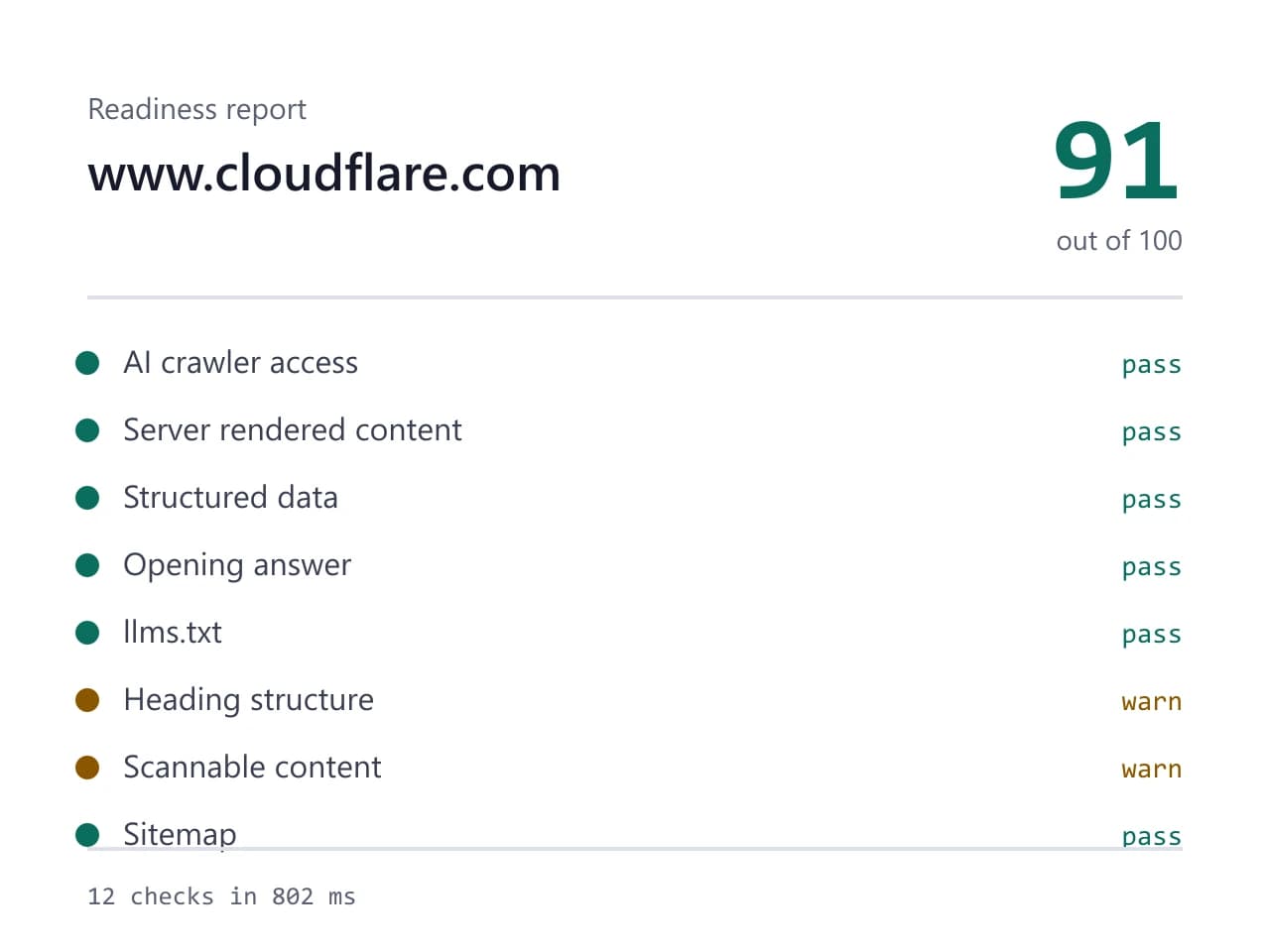
- Site we checked
- cloudflare.com
- Readiness score
- 91 / 100
- Checks run
- 12
- Needs a fix
- 0
- Warnings
- 2
- AI crawlers allowed
- 8 of 8
- Checked on
- 2026-10-16
How we test: every page runs the same checks against a different real site, and we read each report by hand before publishing it. More on the about page.
The robots.txt rules this AI crawler checker follows
A robots.txt file is a list of groups, and each group starts with one or more User-agent lines. Our parser reads those groups first. Then it looks for a group that names the bot it is testing, for example GPTBot. If that group exists, the bot obeys it and nothing else. Therefore the bot skips the star group completely, even when that group is longer and stricter. Agent names match without regard to case, so gptbot and GPTBot select the same group. Silence counts as permission, because a bot with no group at all may fetch every path.
Path rules work by length, not by order. So the checker compares every Allow and Disallow line in the winning group, then keeps the one with the longest match. A tie goes to Allow. For example, Disallow: /blog and Allow: /blog/public let a bot fetch /blog/public/post. Only two wildcards exist. A star stands for any run of characters. A dollar sign pins the rule to the end of the path. As a result, Disallow: /*.pdf$ blocks PDFs and leaves /guide.pdf.html alone. An empty Disallow line allows everything, which trips people up often.
How one stray block hides you from a single AI bot
Here is the accident we see most often. A site ships a friendly robots.txt with User-agent: * and an empty Disallow, which opens the whole site. Later someone adds a second group for one AI bot, usually after a blog post about training data. That new group says User-agent: GPTBot and Disallow: /. Because groups never merge, GPTBot now reads only its own group and finds a full block. Meanwhile every other crawler still sails through the star group, so traffic logs look normal and nobody notices for months.
The reverse accident happens too. Someone writes a star group that disallows /search and /cart, then adds a permissive group for ClaudeBot. That second group drops the earlier restrictions for ClaudeBot alone, since the bot uses only its own group. Both cases come from the same misreading. Therefore the checker prints the group it used and the line that decided the verdict. You see the rule, not a red icon. For example, a blocked result names the agent line, the exact Disallow path, and the length of the match.
Why robots.txt is a request and not a lock
Now the honest part. A robots.txt file carries no authentication and no enforcement, so a crawler that ignores it still gets your bytes. The large AI companies publish their agent names and say they respect the file. In practice the named bots generally do. However, plenty of scrapers use a browser user agent string and never fetch robots.txt at all. Therefore a green result here means you have granted permission. It does not mean you have built a fence.
The flip side matters just as much. Removing a block grants permission, and permission is where your control ends. You cannot make a crawler visit, and you cannot make an engine quote the page it fetched. So treat robots.txt as the front door rather than the whole building. Open it, then give the bot something worth reading. Because the file is public, anyone can read your rules, which also means a competitor can see which bots you welcome.
What this AI crawler checker cannot tell you
This AI crawler checker tests one path at a time. By default it checks your home page. So a rule that blocks /pricing or /docs stays invisible until you run those URLs. Large sites often carry dozens of narrow rules, and a single home page result cannot represent all of them. Run the paths that matter to your buyers, then compare the verdicts. In addition, the checker reads the file as it exists right now. A rule your team edits tomorrow shows up on the next run only.
A robots.txt check also says nothing about your firewall. Cloudflare, Fastly and your host can block a bot long before it ever asks for the file, and that block leaves no trace in robots.txt. Therefore a clean report plus empty crawler logs points at your edge, not at your rules. Bot management rules, country blocks and aggressive rate limits all behave this way. Finally, permission is not the same as a citation, since an engine still has to find your page useful. That second question belongs to the mention check, which asks real buyer prompts and records which brands come back.
How the AI crawler checker decides each verdict
| Rule in RFC 9309 | What it means for your site |
|---|---|
| Groups keyed by User-agent | each agent name starts a new block of Allow and Disallow lines |
| Own group beats the star group | a bot with its own group ignores User-agent: * entirely |
| Groups never merge | the bot reads one group, never two, so one stray block is enough |
| Case insensitive names | gptbot, GPTBot and GPTBOT all select the same group |
| Longest path match wins | Allow: /blog/public beats Disallow: /blog for /blog/public/post |
| Allow wins a tie | when two rules match the same length, the bot may fetch |
| Only * and a trailing $ | Disallow: /*.pdf$ blocks PDFs and skips /guide.pdf.html |
| Empty Disallow allows all | a bare Disallow: line opens the whole site to that group |
AI crawler checker FAQ
Is the AI crawler checker free?
Yes. It fetches robots.txt and parses it on our server, and no language model runs, so a check costs us almost nothing. You do not need an account either. The paid mention check is separate, because each of its runs has a real cost.
Which AI crawlers do you check?
Eight: GPTBot, OAI-SearchBot and ChatGPT-User from OpenAI, ClaudeBot and Claude-SearchBot from Anthropic, PerplexityBot, Google-Extended and Applebot-Extended. Each bot gets its own verdict, since each one can land in a different group. The report quotes the rule that produced it.
Does Disallow: / really block GPTBot?
Yes, when GPTBot has its own group carrying that line. The bot then ignores your star group completely, even a permissive one. Remove the line, or narrow it to the paths you actually want private.
Can an AI crawler ignore my robots.txt?
It can. The file is a published request with no enforcement behind it, so compliance stays voluntary. Named bots from the large AI companies generally honor it, however many anonymous scrapers do not. Block those at your edge instead, because robots.txt will not stop them.
Why does my log show no GPTBot hits when the check says allowed?
Usually something above robots.txt refuses the request. Check your CDN rules, your bot management settings and your rate limits first. A crawler can also simply choose not to visit, since permission is an invitation rather than a schedule.