Free ChatGPT visibility checker
This free ChatGPT visibility checker reads your robots.txt and reports what OpenAI's three bots are allowed to do. GPTBot handles training and browsing, OAI-SearchBot builds the search index, and ChatGPT-User fetches a page when someone follows a link in a chat. Each row quotes the rule that decided it.
By The Promptscope team (Product and testing). Last updated .
How to use the free ChatGPT visibility checker, step by step
- Type your domain into the box above, for example nasa.gov, and press the button.
- Wait about a second while the checker fetches your home page, robots.txt, llms.txt and sitemap.
- Then open the crawler row and read the separate verdict for GPTBot, OAI-SearchBot and ChatGPT-User.
- Finally, clear any blocked agent first, because the cap on your score lifts only after that rule goes.
The first 3 runs each day are free. After that, see the pricing page for packs and plans, or read how we test the tool.
Free ChatGPT visibility checker run against a real site
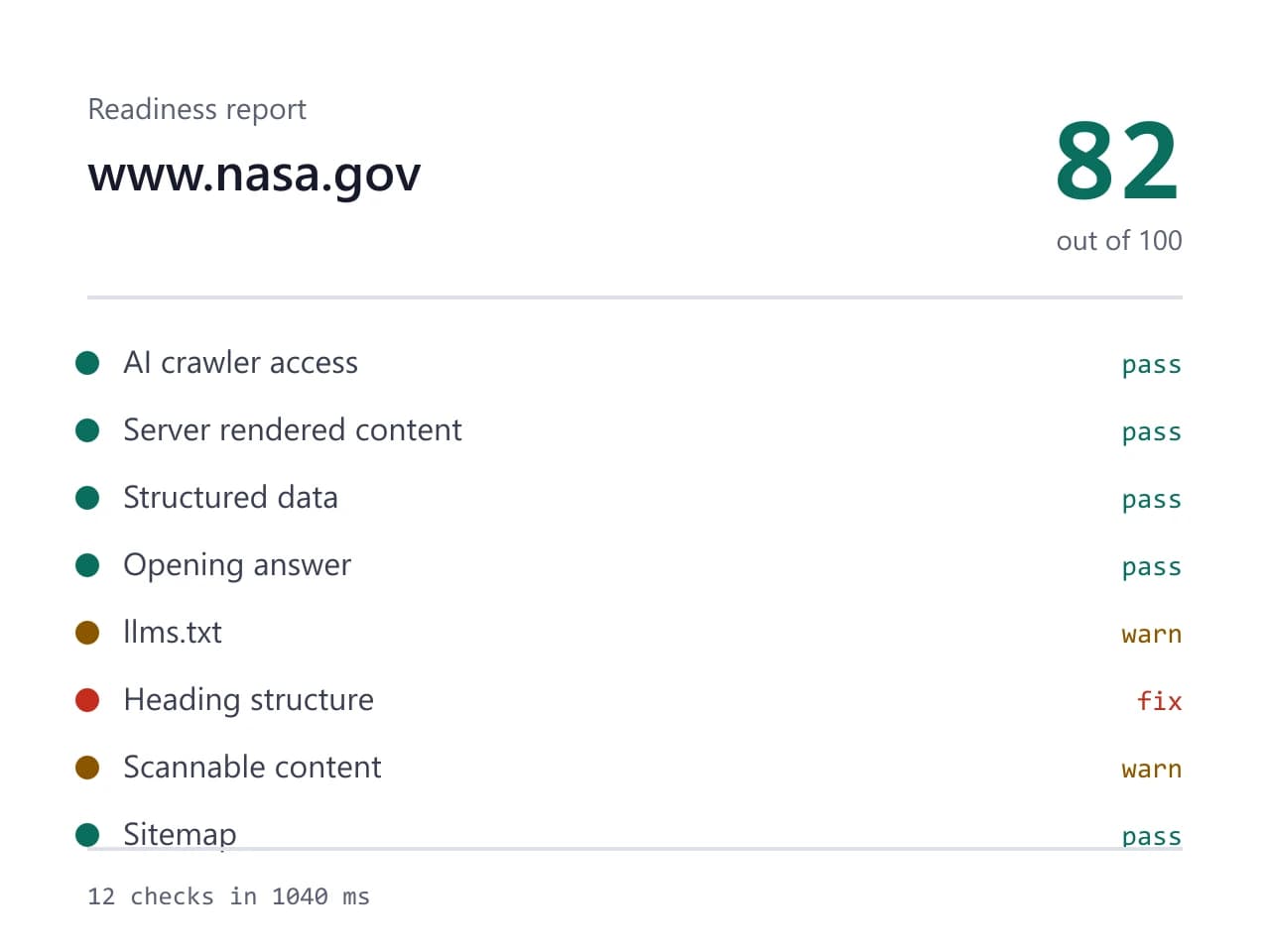
We pointed this checker at nasa.gov and kept what came back. So the card below is an actual report rather than a mockup, and you can run the same check yourself and compare.
- Site we checked
- nasa.gov
- Readiness score
- 82 / 100
- Checks run
- 12
- Needs a fix
- 1
- Warnings
- 3
- AI crawlers allowed
- 8 of 8
- Checked on
- 2026-10-16
How we test: every page runs the same checks against a different real site, and we read each report by hand before publishing it. More on the about page.
Three OpenAI bots, three different jobs
OpenAI publishes three user agents, and each one does a separate job. GPTBot crawls pages for model training and for browsing. OAI-SearchBot gathers pages for the search index that sits behind ChatGPT search. ChatGPT-User acts on the spot, because it fetches a page only when a person in a conversation follows a link or names that URL. So one agent name in your robots.txt can produce a very different outcome from another.
That split matters because site owners rarely think about it. For example, a team that wants to stay out of model training adds a rule for GPTBot and stops there. Their pages still reach the search index, since OAI-SearchBot runs under its own name. Another team copies a stricter template, blocks all three, then wonders why ChatGPT never surfaces the site. The checker prints each agent on its own row, therefore the difference shows up at a glance.
What the free ChatGPT visibility checker looks for in robots.txt
The free ChatGPT visibility checker fetches your robots.txt and reads it the way a crawler does. First it looks for a group that names each agent, then it checks the rules inside that group. An empty Disallow line under an agent means you allow that agent everywhere, because the rule matches no path at all. A single slash after Disallow means the opposite, since it matches every path on the host.
Rules also fall back. When no group names GPTBot, the crawler follows the group under a wildcard user-agent line, so a broad blanket rule can catch it by accident. In addition, an Allow line can carve an exception out of a wider Disallow, which is how many sites open a blog while keeping an app private. The report quotes the exact line it matched, so you never have to guess which rule produced the verdict.
Blocking one bot and blocking all three are not the same
Picture two sites. The first blocks GPTBot and leaves the other two agents alone. Its pages stay out of training, yet ChatGPT search can still index them and ChatGPT-User can still open a link during a conversation. The second site blocks all three. Nothing reaches the index, and a link someone clicks inside a chat comes back empty. Both files look strict from the outside, although the practical result differs a lot.
Accidents cause most of these rules. A security plugin ships a blocklist, a staging robots.txt survives a launch, or a CDN filter adds bot rules that nobody documents. As a result, the owner often learns about it months later. So the checker treats a blocked agent as a gate instead of an ordinary row: while any AI crawler stays blocked, the checker caps your readiness score and names the rule behind the cap.
What this cannot tell you
Allowing every OpenAI bot does not make ChatGPT cite you. Access is the floor, not the outcome. Whether a model names your brand depends on what other sites say about you, how crowded your category is, and what the model retrieved that day. Therefore treat a clean robots.txt as the entry fee rather than the prize. The free ChatGPT visibility checker measures the part you control, and it stops there on purpose.
Two other limits are worth stating plainly. First, this page checks one URL at a time, so a large site with many templates needs a full crawler instead. Second, it reads the HTML your server returns, which means content that appears only after JavaScript runs will look missing here. That is still a useful warning, because several AI crawlers behave the same way. We also have no relationship with OpenAI, so everything above describes public documentation and nothing more.
OpenAI agents and the robots.txt rules the checker reads
| Agent or rule | What it controls |
|---|---|
| GPTBot | training and browsing, so a block here removes you from both |
| OAI-SearchBot | the index behind ChatGPT search results |
| ChatGPT-User | live fetches when a person follows a link in a conversation |
| Disallow with a slash | blocks every path for the agent named above it |
| Disallow left empty | allows everything, because the rule matches no path |
| Wildcard user-agent group | the fallback, used only when no group names the bot |
| Allow line | carves an exception out of a broader Disallow |
| Score cap | any blocked agent holds the score down until the rule goes |
Free ChatGPT visibility checker FAQ
Is the free ChatGPT visibility checker really free?
Yes. The readiness audit calls no language model, so a run costs us almost nothing and we do not meter it. You do not need an account either. The separate mention check uses credits, because those runs put real questions to a model and that costs real money.
What is the difference between GPTBot and OAI-SearchBot?
GPTBot crawls pages for model training and for browsing. OAI-SearchBot collects pages for the search index that ChatGPT search draws on. They run under separate names in robots.txt, therefore a rule written for one has no effect on the other.
I blocked GPTBot to opt out of training. Did I block ChatGPT search too?
Probably not, although it depends on the rest of the file. A rule under a GPTBot group applies to that agent only. However, if a blanket Disallow also sits under the wildcard group, OAI-SearchBot can fall back to it. Run the check and read which group each agent matched.
How do I allow one OpenAI bot and block another?
Write a separate group for each agent. Put the agent name on its own user-agent line, then put the rule under it: an empty Disallow line allows everything, while Disallow plus a slash blocks everything. Keep the groups apart, since rules do not merge across them.
Will allowing these bots get my site cited in ChatGPT?
No tool can promise that, and this one does not try. Access lets a model read you, yet citation also depends on relevance, competition and what the model retrieved for that question. The mention check measures citations separately, instead of inferring them from your robots.txt.