llms.txt generator
Most llms.txt generator tools crawl your site and paste every URL into one long list, which helps nobody. A good file is short on purpose. It opens with your site name, adds one plain summary line, then links the thirty or so pages you actually want an answer engine to quote.
By The Promptscope team (Product and testing). Last updated .
How to write an llms.txt file, step by step
- Type your domain into the box above, for example vercel.com, and run the readiness check.
- Wait a moment while the checker fetches your home page, robots.txt, sitemap and llms.txt.
- Then open the llms.txt row, because it tells you whether a file exists and whether it holds real links.
- Finally, write the file by hand using the structure below, then run the check again to confirm it parses.
The first 3 runs each day are free. After that, see the pricing page for packs and plans, or read how we test the tool.
Llms.txt generator run against a real site
We pointed this checker at vercel.com and kept what came back. So the card below is an actual report rather than a mockup, and you can run the same check yourself and compare.
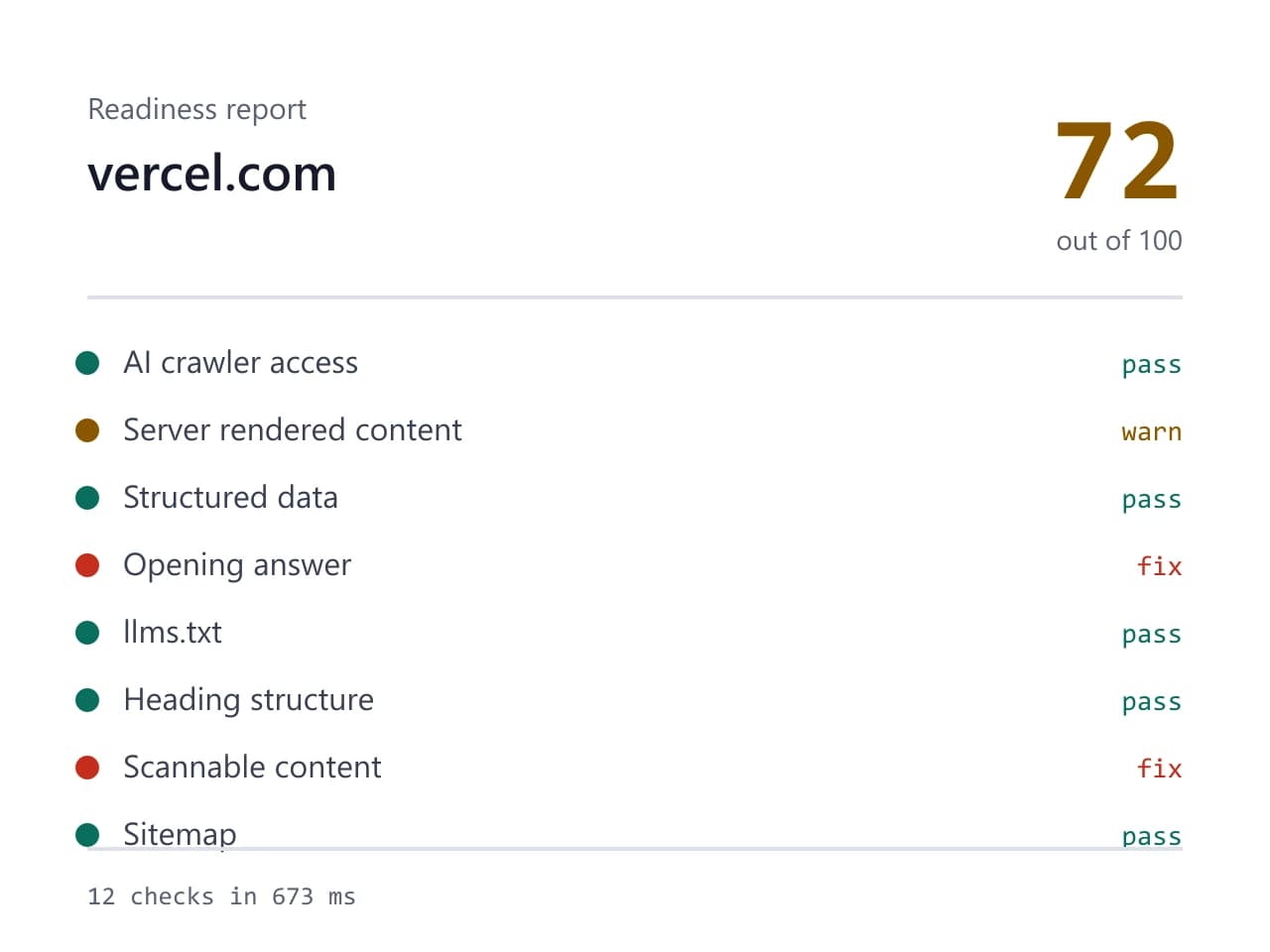
- Site we checked
- vercel.com
- Readiness score
- 72 / 100
- Checks run
- 12
- Needs a fix
- 2
- Warnings
- 2
- AI crawlers allowed
- 8 of 8
- Checked on
- 2026-10-16
How we test: every page runs the same checks against a different real site, and we read each report by hand before publishing it. More on the about page.
What goes in the file, line by line
The format is plain markdown, so any text editor works. Start with an H1 that holds your site name and nothing else. Under it, add a blockquote with one or two sentences that say what the site is and who it serves. Then add H2 sections such as Docs, Guides or Pricing. Inside each section, list markdown links, and give every link a few words of context after a colon.
That context line does most of the work. For example, a bare link to /pricing tells a model nothing at all. A link that reads Pricing: three plans, billed per seat, with a free tier tells it what the page answers. Write each note for a reader who has never seen your product. Also keep the whole file under a page of text, since length invites skimming and skimming loses the detail you meant to send.
Why an llms.txt generator that dumps every URL fails
Most one click tools read your sitemap and print it. The output looks thorough, and it takes four seconds. However, it repeats what sitemap.xml already says, so it adds no signal whatsoever. A model that follows two hundred links learns only that you have two hundred pages. It does not learn which three of them answer the question a buyer is asking.
Thirty deliberate lines beat two thousand automatic ones. Since you pick the pages, you also decide what a model repeats back to a stranger. Therefore treat the file as an editorial job rather than an export. An llms.txt generator can save you some typing, although the choosing is the part that matters, and no crawler can do that for you.
Which pages you want quoted, and which you do not
Start from the pages a buyer would need in order. Your product overview, your pricing page, your getting started guide and your docs index all earn a place. In addition, add one page that explains what you do not do, because a clear boundary prevents a wrong recommendation later. Everything else can wait. A tag archive, a login screen and a cookie policy tell a model nothing useful about your product.
Currency matters as much as selection. A link that returns a 404 teaches a model that your site is careless, so review the file whenever you rename a page or ship a launch. Because the file stays short, that review takes about two minutes. Some teams add a last updated line at the bottom, which also helps whoever inherits the file next year. Then the next person knows how stale it is without opening your changelog.
What an llms.txt generator cannot promise you
Be clear about the status of this format. It is a proposed convention from one author, not a standard from a standards body. No major answer engine promises to fetch it, and several probably ignore it today. Therefore treat the file as a cheap hint rather than a lever. It costs you twenty minutes, so the downside is small, although the upside is not guaranteed either.
Our checker also stops short of writing the file for you. Instead, it verifies whether /llms.txt exists, whether it contains words and whether it holds links, and then it reports what it found. Writing the thing is a judgement call, so we would rather hand you a structure than a crawl dump. Meanwhile, remember that a perfect file cannot rescue a site whose robots.txt blocks GPTBot, since the crawler never arrives to read it.
The parts of a good llms.txt file and what each part does
| Part | What it does |
|---|---|
| H1 with the site name | names the subject once, so a model stops guessing from your nav |
| Blockquote summary | one or two sentences that say what you sell and to whom |
| H2 sections | groups related links, for example Docs, Guides, Pricing |
| Markdown links | plain absolute URLs that a parser can follow without cleanup |
| Context after each link | a few words saying what question that page answers |
| An optional section | pages a model may skip when its context runs short |
| Length | roughly thirty lines, because a long file buries the good pages |
| Location | /llms.txt at the root of the domain, served as plain text |
Llms.txt generator FAQ
Do I need an llms.txt generator, or can I write it myself?
You can write it yourself in about twenty minutes. The format is plain markdown with a heading, a summary and a few lists of links. A generator only saves typing, and most of them pad the file with pages you never wanted quoted.
Does ChatGPT actually read llms.txt?
Nobody has promised that it does. The file is a proposed convention rather than a published standard, so support varies and none of it is documented. We report whether yours exists and parses, because that part is in your control. Treat the rest as an experiment with a low cost.
Where does the file go and what should it be called?
It goes at the root of your domain, at /llms.txt, served as plain text. Do not bury it in a subfolder. If your host rewrites unknown paths, check that the file returns a 200 and not your custom 404 page.
How often should I update it?
Review it whenever you rename a page, launch a product or retire a guide. Since the file is short, a pass takes a couple of minutes. A stale file with dead links is worse than no file, because it teaches a model to distrust what you publish.
Should llms.txt list every page on my site?
No. That is what sitemap.xml already does, and duplicating it wastes the one chance you have to be selective. List the pages you would want read aloud to a buyer. Everything else belongs in the sitemap instead.