Best AI search visibility checker
The best AI search visibility checker for your site depends on what you need to learn. Free readiness tools tell you whether answer engines can reach and parse your pages. Monitoring platforms track which brands models name over weeks. Agencies do the work for you. Start free, because a blocked crawler breaks every other plan.
By The Promptscope team (Product and testing). Last updated .
How to compare visibility tools in ten minutes, step by step
- Type a domain into the box above, for example gov.uk, and press the button.
- Wait about a second while the checker fetches the home page, robots.txt, llms.txt and the sitemap.
- Then judge the twelve rows against the criteria further down this page, because evidence beats a headline number.
- Finally, fix anything red, run the check again, and only then decide whether you also need continuous tracking.
The first 3 runs each day are free. After that, see the pricing page for packs and plans, or read how we test the tool.
Best AI search visibility checker run against a real site
We pointed this checker at gov.uk and kept what came back. So the card below is an actual report rather than a mockup, and you can run the same check yourself and compare.
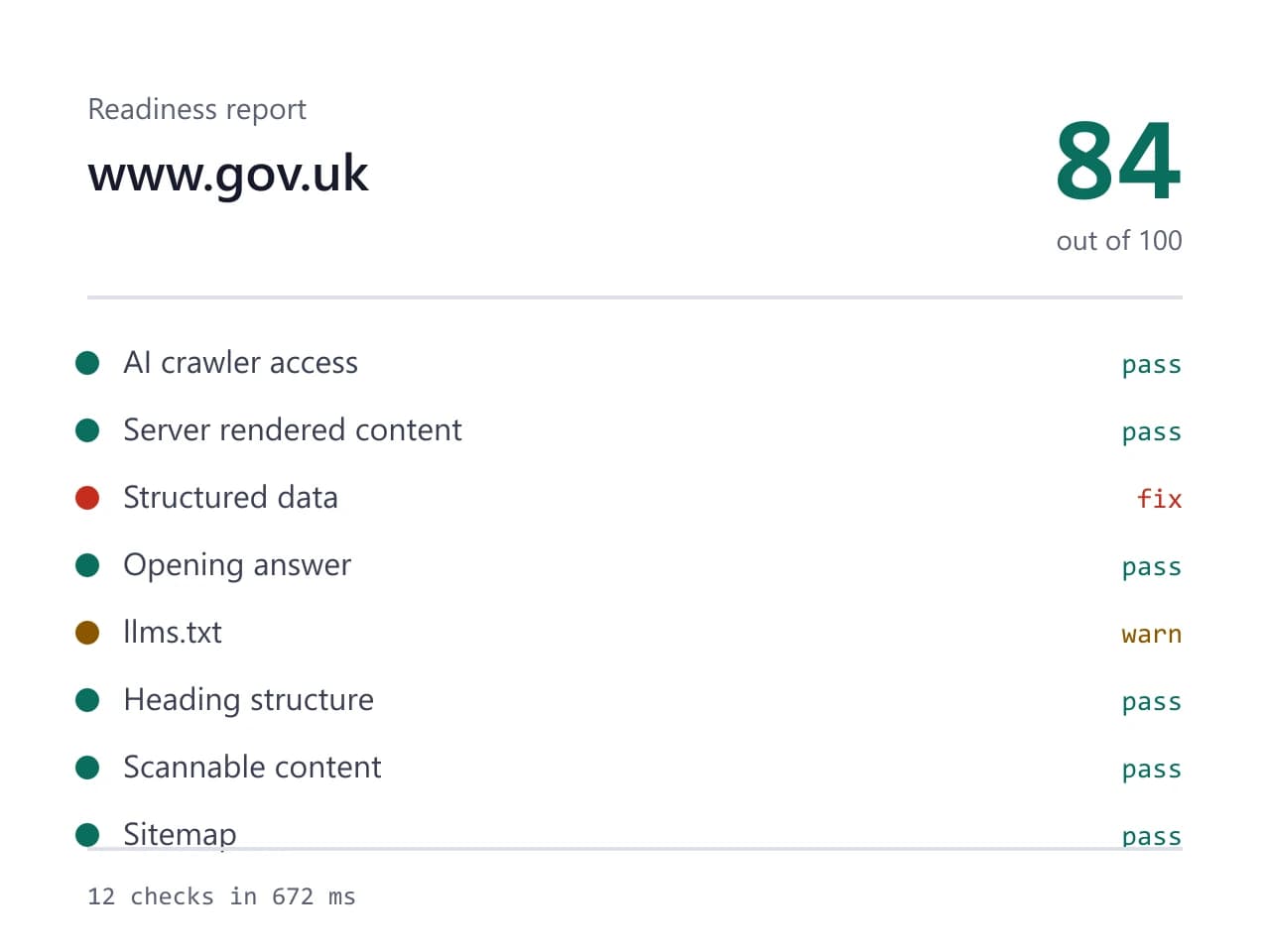
- Site we checked
- gov.uk
- Readiness score
- 84 / 100
- Checks run
- 12
- Needs a fix
- 1
- Warnings
- 1
- AI crawlers allowed
- 8 of 8
- Checked on
- 2026-10-16
How we test: every page runs the same checks against a different real site, and we read each report by hand before publishing it. More on the about page.
What the best AI search visibility checker has to do
Every best AI search visibility checker list starts in the same place, so it helps to name the job first. A tool in this market has to answer two separate questions. First, can an answer engine reach your pages and understand them? Second, do models actually name your brand when a buyer asks for a recommendation? Most tools handle one side well and the other side badly, because the two jobs need very different machinery.
Keep those questions apart while you shop. Readiness is technical, cheap to measure and fully under your control. Mentions cost real money to measure, since every run burns model time, and they move for reasons you do not own. Therefore a fair comparison asks what a tool measures before it asks what a tool charges. A cheap tool that answers the wrong question is not a bargain.
Three kinds of tool, and what each one trades away
Free technical readiness checkers fetch a page, read robots.txt, llms.txt and the sitemap, then score what they find. They finish in about a second and they call no language model, so they can stay free without a catch. However, they only describe the plumbing. A perfect readiness score proves an engine can read you, although it says nothing about whether one will quote you.
Prompt monitoring platforms sit at the other end of the market. They ask many buyer questions across several models, repeat them every week, and chart how often your brand appears. That history is the real product, since a single snapshot cannot separate a trend from noise. In exchange you pay every month, you wait weeks for a useful line, and you still fix the technical problems yourself. Done-for-you agencies bundle the fixing with the reporting, so they suit teams with budget and no spare engineer, though you give up any cheap way to check the work.
Criteria that separate a real tool from a demo
Judge any tool by what it shows you, not by the size of the number on the badge. Does it print its evidence? A row that says your markup is weak is a slogan. A row that quotes the two JSON-LD blocks that failed to parse is a finding, because you can act on it in a minute. Ask also whether the tool names the crawlers it tests, since the phrase AI bots covers eight user agents that behave differently.
Then look hard at whatever sits behind a lock. Some tools blur a chart to suggest that real data is waiting for your credit card. Instead, a tool should say plainly whether a paid run has happened at all. Ours lists the twelve buyer prompts it would send and calls no model until you run it, so nothing on the screen is blurred or invented. Finally, check whether the tool admits its limits, because anything promising a ranking inside ChatGPT is guessing.
When a different kind of tool suits you better
Our check is deliberately narrow. It reads one URL at a time, so a site with thousands of templates needs a crawler instead. A home page cannot represent a docs section, a pricing page and four hundred blog posts at once. If that describes your site, buy the crawler first and use this page to sanity check a handful of important URLs.
The mention side has an honest limit too. Twelve fixed prompts on demand is a sample, not a tracking system. Therefore a brand team that reports monthly on share of voice across markets and languages will outgrow it, and a monitoring platform earns its fee there. The check also reads server rendered HTML, so content that appears only after JavaScript runs will look missing. Since several AI crawlers behave the same way, treat that as a warning rather than a bug.
How the best AI search visibility checker options compare
| Option | The honest trade-off |
|---|---|
| Free readiness checker | fast and genuinely free, but it only describes the plumbing |
| Prompt monitoring platform | real history across many prompts, at a monthly fee |
| Done-for-you agency | someone else does the fixing, at the highest cost |
| Site-wide crawler | covers every template, which one URL at a time cannot |
| Our readiness check | twelve checks, no account, no model call, one page |
| Our mention check | twelve buyer prompts on demand, sampled rather than tracked |
| Any tool that hides evidence | a score you cannot verify is a guess with styling |
Best AI search visibility checker FAQ
Which is the best AI search visibility checker for a small site?
For a site under a few hundred pages, a free readiness check plus an occasional mention run usually covers it. You find the technical problems for nothing, then you spend credits only when you want to see which brands a model names instead of yours. A monthly platform mainly buys history, and history is worth less when your pages barely change.
Is a free checker good enough, or do I need a paid one?
Start free, because the expensive problems are usually free to find. A blocked crawler, a broken JSON-LD block or a missing sitemap costs nothing to detect and very little to fix. Pay for the second layer once you have cleared those and still want to know who gets recommended in your place.
How often should I run a visibility check?
Run the readiness check again after any change to robots.txt, your theme or your CMS, since those three break things quietly. Otherwise once a month is plenty. Mention checks work differently, because they only mean something as a series, so pick an interval you will actually keep.
Do these tools work in every language and country?
The readiness side reads whatever HTML your server returns, so it works anywhere. The mention side asks its twelve prompts in one language at a time, so a brand selling across several markets will want a tool built for multi market tracking. That is a real gap here, and we would rather say so than hide it.
What does a locked result actually mean?
Here it means the run has not happened yet, and nothing more. When you are out of free runs, we show the exact prompts we would send and we call no model, so there is no hidden chart behind the button. Any tool that blurs a number is asking you to assume data exists.