llms.txt file checker
llms.txt file checks are simple, and this tool runs them for you in about a second. It fetches the file from your site root, confirms the server returned real text instead of a styled error page, and counts the words and links inside. Then it reports what it found, with the evidence.
By The Promptscope team (Product and testing). Last updated .
How to check an llms.txt file, step by step
- Type your domain into the box above, for example example.com, and press the button.
- Wait about a second while the server fetches your home page, robots.txt, sitemap and llms.txt.
- Then open that row in the report, because it shows the exact response your server sent back.
- Finally, fix the file or write a first version, then run the check again to confirm it returns real text.
The first 3 runs each day are free. After that, see the pricing page for packs and plans, or read how we test the tool.
Llms.txt file run against a real site
We pointed this checker at anthropic.com and kept what came back. So the card below is an actual report rather than a mockup, and you can run the same check yourself and compare.
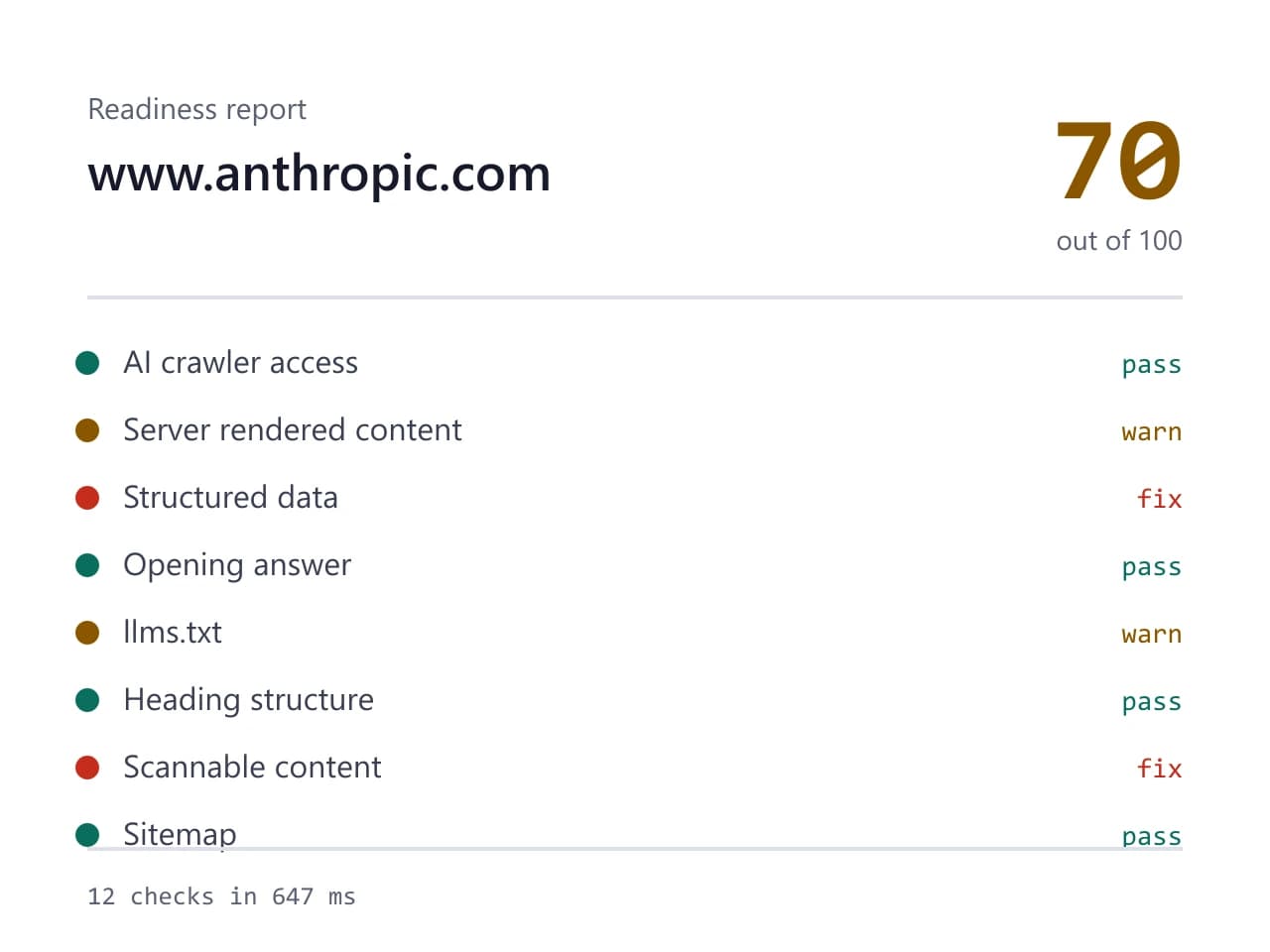
- Site we checked
- anthropic.com
- Readiness score
- 70 / 100
- Checks run
- 12
- Needs a fix
- 2
- Warnings
- 2
- AI crawlers allowed
- 8 of 8
- Checked on
- 2026-10-16
How we test: every page runs the same checks against a different real site, and we read each report by hand before publishing it. More on the about page.
What an llms.txt file actually is
An llms.txt file is a plain markdown document that sits at the root of your site, right next to robots.txt. It names what the site is, then links the handful of pages you actually want an answer engine to quote. The idea comes from a public proposal rather than from any search company, so treat it as a convention and not a rule. It takes about ten minutes to write, and it costs nothing to host.
The format stays deliberately boring. You open with a single H1 that names the site, add one short summary line, then group your links under a few headings. Because the file is markdown, a person can read it and a model can parse it without special tooling. Therefore it works as a short table of contents for machines, and it does not try to do anything else.
Why an llms.txt file often fails the check
Most failures here have nothing to do with writing. Instead, they come from what your server sends back. Plenty of content systems answer every unknown path with a friendly HTML page and a 200 status code, so a request for /llms.txt returns a styled screen that politely says nothing was found. Open that in a browser and something appears, which is exactly why the problem hides for months.
So the checker does not stop at the status code. It reads the body, looks for HTML tags and template boilerplate, and flags the response when the server clearly returned a rendered page. Next, it counts words and links, since an empty stub passes a naive existence test while telling a model nothing useful. A file with two lines and no links barely improves on having no file at all.
What a good file contains
Start with the name of the site and one sentence that explains what you sell and who buys it. Write that line the way you would answer a stranger at a conference, because it is the part a model is most likely to lift. After that, list your real reference pages: documentation, pricing, a clear product overview, and anything that answers a question people keep asking.
Label every link with a few words of context, since a bare URL tells a reader nothing. Skip the marketing pages that repeat each other, and skip anything you would not want quoted back at you. For example, a payments company might link its API reference, its pricing page and its docs index, then stop. Finally, keep the list current, because dead links age badly and make the whole file look stale.
What an llms.txt file cannot do for you
This is the honest part. No major answer engine has confirmed that it reads the file, and the proposal is not a standard that any group has formally adopted. So nobody can promise you a ranking effect from it, and any tool that does promise one is guessing. Our check tells you whether the file exists and whether it is readable, which is a much smaller claim.
It also replaces nothing you already run. Your sitemap still tells crawlers which pages exist, and robots.txt still decides who may fetch them. Therefore, while an AI crawler stays blocked, this file changes nothing whatsoever. Treat it as cheap insurance instead: ten minutes of work, no real risk, and a small upside if the convention catches on.
What the llms.txt file check looks at
| Signal | Why it matters |
|---|---|
| The path responds | the file belongs at the site root, at /llms.txt |
| Real text, not HTML | catches the styled error screen served with a 200 status |
| Word count | a two line stub passes a naive test and helps nobody |
| Link count | the file earns its place by naming pages worth quoting |
| One clear site summary | the sentence a model is most likely to lift |
| Labeled links | a bare URL tells a reader nothing about the page |
| Freshness | dead links make the file misleading rather than useful |
Llms.txt file FAQ
Is llms.txt an official standard?
No. It is a public proposal with a published spec, and anyone can follow it. However, no standards body has adopted it, so nothing obliges a crawler to look for it. That is worth knowing before you spend a day on yours.
Does ChatGPT read llms.txt?
Nobody outside the major labs can answer that with confidence, and none of them have confirmed it. So the honest position is that the file might help and will not hurt. Because it takes ten minutes, most teams write one anyway and move on.
My llms.txt file returns 200, so why did the check fail?
Your server probably answered with an HTML page instead of text. Many content systems render a friendly not found screen for any unknown path and still send a 200 status. The checker reads the body, finds HTML tags, and reports the file as missing rather than valid.
Where exactly does the file go?
At the root of the domain, so example.com/llms.txt and nowhere else. A subfolder or a subdomain copy does not count for the main site. If a build step generates your pages, add the file to the static or public directory instead of writing it through the CMS.
Do I still need robots.txt and a sitemap?
Yes, and they matter more. Robots.txt decides which crawlers may fetch your pages at all, while a sitemap tells them what exists. This file only suggests what is worth reading, therefore it helps nothing while a crawler sits blocked.